

A 34-inch ultrawide monitor transforms your workflow, but its size and weight demand a proper foundation. A standard monitor arm often won’t suffice, risking sagging, instability, or worse. The right arm not only safely supports your investment but unlocks the full ergonomic potential of your expansive screen.
Choosing the correct model hinges on three key factors: robust weight capacity, compatible VESA mounting, and sufficient range of motion to position the screen comfortably. To simplify your search, we’ve analyzed the top arms built to handle the unique demands of a large ultrawide display.
Overview

“Fits ultrawide monitors up to 49″ and standard flat and curved monitors up to 32” including the 1000R Curved Screens“

“Fits single screens up to 34 inches diagonal, 4 to 22 pounds and up to 3.6 inches deep; compatible with VESA patterns 75x75mm and 100x100mm“

“The monitor arm is designed for larger monitors. Its gas spring counterbalances the weight of the screen allowing easy adjustment to the required position allowing a safe and comfortable working position.“

“Fits single screens up to 34 inches diagonal and 3.2-11.3 kilograms; compatible with VESA patterns 75x75mm and 100x100mm“
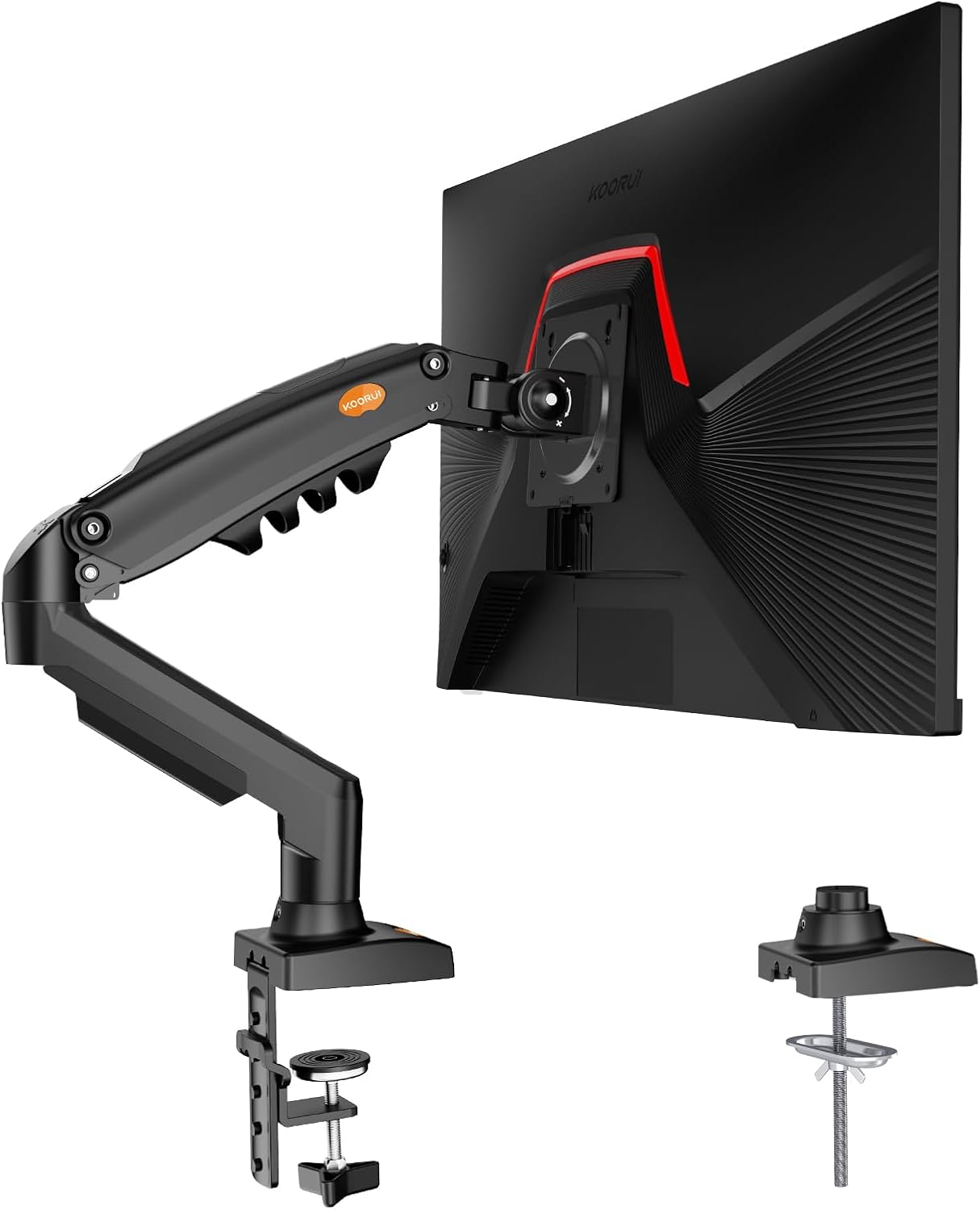
“KOORUI monitor stand fits most 13” – 27” Monitors or computer screens with a load up to 22 lbs, VESA compliant 75×75mm and 100×100mm.”
Comparison Overview: 34-Inch Ultrawide Monitor Arms
| Feature | VIVO Heavy Duty | Ergotron LX Pro | GRIFEMA GB2003-1 | Ergotron LX Wall Mount | KOORUI Gas Spring |
|---|---|---|---|---|---|
| Mount Type | Wall Mount | Desk Mount (Clamp) | Desk Mount (Clamp/Grommet) | Wall Mount | Desk Mount (Clamp/Grommet) |
| Max Screen Size | Up to 49″ | Up to 34″ | Up to 32″ | Up to 34″ | 17″ – 32″ |
| Max Load Capacity | 20 kg | 10 kg (22 lbs) | 9 kg | 11.3 kg | 9 kg |
| Key Mechanism | Pneumatic Spring Lift | Counterbalanced Spring | Gas Spring | Counterbalanced Spring | Gas Spring |
| Height Adjustment | 33 cm (Pneumatic) | 33 cm (13 in lift) | 26 cm (160-420mm) | 33 cm | 43 cm (16.9 in) |
| Warranty | Standard | 10-Year | Standard | 10-Year | Standard |
Detailed Product Analysis
1. VIVO Premium Aluminum Heavy Duty Wall Mount
Best for: Maximum stability and space-saving for heavy, large ultrawides.
This is a heavy-duty wall-mounted solution designed for the largest and heaviest screens on the market, including 49-inch ultrawides. Its pneumatic lift provides smooth vertical adjustment, and its solid aluminum construction ensures zero sag. By moving the mount to the wall, it completely clears the desk of any stand or clamp footprint.
“Fits ultrawide monitors up to 49″ and standard flat and curved monitors up to 32” including the 1000R Curved Screens“
Key Considerations:
- Pro: Unmatched weight capacity and size compatibility for future upgrades.
- Pro: Folds flat against the wall for a clean, space-efficient look.
- Con: Requires permanent wall installation into studs or masonry.
- Con: Desk placement becomes fixed relative to the wall.
See Other Options


Verdict: The ultimate choice for a permanent, ultra-stable mounting solution for a hefty 34-inch or larger ultrawide, especially where desk real estate is precious.
> > Check Price for VIVO Wall Mount
2. Ergotron LX Pro Premium Desk Mount
Best for: Premium ergonomics, warranty, and flawless performance on a desk.
A top-tier desk-mounted arm from the industry leader, Ergotron. It is engineered specifically for the weight range of a 34-inch ultrawide, offering silky-smooth, counterbalanced movement with precise tension control. The renowned 10-year warranty underscores its build quality and long-term reliability for daily adjustments.
“Fits single screens up to 34 inches diagonal, 4 to 22 pounds and up to 3.6 inches deep; compatible with VESA patterns 75x75mm and 100x100mm“
Key Considerations:
- Pro: Exceptional, fluid motion and stability with premium materials.
- Pro: Industry-leading 10-year warranty for peace of mind.
- Con: Premium price point.
- Con: Grommet mount requires a separate, optional purchase.
Verdict: The gold-standard desk mount for users who prioritize effortless adjustability, supreme stability, and long-term value from a trusted brand.
Read our guide to wall mount monitors
> > Check Price for Ergotron LX Pro
3. GRIFEMA GB2003-1 Gas Spring Desk Mount
Best for: A cost-effective, feature-rich gas spring arm for standard 34-inch models.
A value-focused desk arm that brings key premium features—like a full-motion gas spring and dual mounting options—to a more accessible price point. It offers a wide range of motion, including generous tilt, which is ideal for finding the perfect angle to reduce glare on a large, curved screen.
“The monitor arm is designed for larger monitors. Its gas spring counterbalances the weight of the screen allowing easy adjustment to the required position allowing a safe and comfortable working position.“
Key Considerations:
- Pro: Excellent value with smooth gas spring operation.
- Pro: Includes both C-clamp and grommet mounting hardware in the box.
- Con: Upper limit of 9kg may be tight for the heaviest 34-inch models—check your monitor’s weight carefully.
- Con: Brand carries less recognition than premium counterparts.
Verdict: A strong contender for most 34-inch ultrawides, offering smooth adjustments and solid build quality at a mid-range price, provided your monitor is within its weight limit.
> > Check Price for GRIFEMA Arm
4. Ergotron LX Single Monitor Wall Mount
Best for: A premium, ergonomic wall-mounting solution from a trusted brand.
This is the wall-mounted equivalent of the acclaimed LX series, bringing Ergotron’s smooth articulation and robust 10-year warranty off the desk. It offers excellent extension and retraction, allowing you to pull the screen to an optimal viewing distance before tucking it neatly against the wall.
“Fits single screens up to 34 inches diagonal and 3.2-11.3 kilograms; compatible with VESA patterns 75x75mm and 100x100mm“
Key Considerations:
- Pro: Ergotron’s signature smooth motion and stability, mounted on the wall.
- Pro: Clean cable management and a 10-year warranty.
- Con: Higher cost than basic wall mounts.
- Con: Requires secure wall installation; not a portable solution.
Verdict: The ideal choice for users who want the premium quality and adjustability of an Ergotron arm but prefer the permanent, space-saving benefits of a wall mount.
> > Check Price for Ergotron Wall Mount
5. KOORUI Gas Spring Desk Mount
Best for: A budget-friendly adjustable arm with a strong height range.
This model positions itself as an economical entry point into gas spring arms, offering a surprisingly generous vertical height adjustment range. It provides the core functionalities of tilt, swivel, and rotation needed to position a large screen comfortably.
“KOORUI monitor stand fits most 13” – 27” Monitors or computer screens with a load up to 22 lbs, VESA compliant 75×75mm and 100×100mm.”
Key Considerations:
- Pro: Most affordable option with gas spring functionality.
- Pro: Largest vertical height adjustment range on this list.
- Con: Build quality and adjustment smoothness reflect its budget orientation.
- Con: Tilt range is more limited (+85° to -30°) than some competitors.
Verdict: A viable budget-conscious option for lighter 34-inch ultrawides, prioritizing basic ergonomic adjustment and maximum desk clearance at the lowest cost.
Check this guide to the best gas spring monitor arms
> > Check Price for KOORUI Arm

“..made from aircraft-grade aluminium alloy, which is stronger than iron made. So this single monitor mount easily supports 13 to 32 inches screens weighing up to 19.8 pounds.”
Final Recommendations
- For Unbeatable Desk Performance & Warranty: The Ergotron LX Pro is the definitive investment.
- For Best Value on a Desk: The GRIFEMA GB2003-1 offers the best balance of smooth gas spring performance and price.
- For a Permanent, Space-Saving Wall Solution: Choose between the heavy-duty VIVO for maximum capacity or the premium Ergotron LX Wall Mount for best-in-class motion.
- For a Strict Budget: The KOORUI arm provides essential adjustability at the lowest entry point.
Always verify your specific monitor’s weight and VESA pattern before purchasing. A properly supported 34-inch ultrawide is the key to a comfortable, productive, and immersive workspace.
Q&A: Your Monitor Arm Questions Answered
Q1: Is a monitor arm strong enough for a 34-inch ultrawide?
A: Yes, provided you choose an arm specifically rated for the weight and size. A typical 34-inch ultrawide weighs 6-9 kg. Always select an arm with a maximum load capacity that exceeds your monitor’s weight by a margin for optimal stability and safety.
Q2: Are all 34-inch monitors VESA compatible?
A: Most are, but not all. It’s crucial to check your monitor’s specifications or the back panel for 75x75mm or 100x100mm mounting holes. Some sleek models require a proprietary adapter, which is an extra cost and potential hassle.
Q3: What’s the difference between a gas spring and a pneumatic arm?
A: Both use internal mechanisms (gas in a cylinder) to counterbalance the monitor’s weight for easy adjustment. The terms are often used interchangeably in product listings. The key takeaway is that both provide smoother, easier movement than basic mechanical arms with friction hinges.
Q4: Can I mount an ultrawide monitor on a wall?
A: Absolutely. Wall mounts like the VIVO or Ergotron LX models are excellent for saving desk space and creating a floating look. They must be installed securely into wall studs or solid masonry, never just into drywall.
Q5: Will a monitor arm eliminate screen wobble?
A: A high-quality, properly installed and tensioned arm will significantly reduce wobble compared to a stock stand, especially when typing. However, some minimal movement may remain, particularly if you have a very heavy screen on a long extension or if your desk itself is unstable.
Q6: What does “counterbalance” mean?
A: Counterbalance is the technology (like a gas spring) inside the arm that offsets the monitor’s weight. When correctly adjusted, it allows you to position the screen effortlessly with one finger and have it stay firmly in place, without slowly sinking or rising.
Q7: How do I adjust the tension on a gas spring arm?
A: Most arms have a tension adjustment knob or bolt, typically accessed with an Allen key. You turn it to increase or decrease the resistance until the monitor moves smoothly and stays put at your desired height. Refer to the specific product’s manual.
Q8: Can I switch my monitor from landscape to portrait mode with an arm?
A: Yes, if the arm offers 360° rotation. This is a standard feature on most quality arms. It allows you to pivot the screen into portrait orientation, which is great for coding, reading documents, or social media feeds.
Q9: What’s more stable: a clamp mount or a grommet mount?
A: A grommet mount (installed through a hole in the desk) is generally more stable as it distributes force directly through the desk material. A C-clamp is still very secure for most setups and doesn’t require drilling, but the grommet method is preferred for heavier monitors for ultimate rigidity.
Q10: Do monitor arms come with all necessary cables for management?
A: They usually include cable channels, clips, or zip ties to route and secure your cables neatly along the arm. They do not include replacement video (HDMI/DisplayPort) or power cables for your monitor.
Q11: How far can a monitor arm extend from the wall or desk?
A: This varies by model. “Reach” or “extension” is a key spec to check if you need to pull the screen closer to you. Desk arms typically extend 400-500mm. Wall mounts have a similar horizontal reach when extended.
Q12: My desk is against a wall. Can I still push the monitor back?
A: This is a common limitation. While you can push it back, the arm mechanism itself needs space. You’ll likely need to leave several inches between the wall and the back of your desk to allow the arm to articulate and tilt properly.
Q13: Is a 10-year warranty on an arm like Ergotron’s standard?
A: No, it’s exceptional. Most monitor arms offer 1-5 year warranties. A 10-year warranty indicates superior build quality, rigorous testing, and a manufacturer’s high confidence in product longevity.
Q14: Can I use a monitor arm with a standing desk?
A: Yes, it’s an excellent combination. The arm moves with the desk, allowing you to maintain the perfect viewing height and distance whether sitting or standing. Ensure your desk can handle the combined weight of the monitor and arm.
Q15: What’s the main reason to choose a premium arm over a budget one for an ultrawide?
A: Consistency and long-term performance. A premium arm offers more precise tension control, smoother motion, higher-grade materials to prevent sag, and better stability. For a valuable 34-inch monitor, the arm is a critical support system where cutting corners can lead to frustration or risk.

